
After Effects intimidates most beginners. The interface looks complex, keyframes seem mysterious, and the learning curve appears steep. This bootcamp eliminates that intimidation through structured, project-based instruction that builds confidence rapidly.
You’ll create six complete projects from scratch: social media advertisements, animated infographics, logo reveals, medical animations, and compositing exercises. Each project teaches specific After Effects concepts while building toward comprehensive motion graphics skills.
Animation Fundamentals Through Practice
The training starts with transform properties, the foundation of all motion graphics work. You’ll animate position, scale, rotation, and opacity, understanding how keyframes create movement over time. These aren’t abstract exercises; you’re building actual social media content immediately.
Text animation receives extensive coverage through text animators, enabling complex typography effects without manually keyframing each letter. You’ll create write-on effects using masks and stroke properties, animate multiple text layers with staggered timing, and build professional title sequences.
Masking and Compositing Techniques
Masks isolate portions of layers, creating shapes and revealing specific elements. You’ll use them for text effects, shape animations, and isolating video areas. Track mattes take masking further, using one layer to control another layer’s visibility, enabling sophisticated reveal animations and transitions.
The compositing lessons integrate multiple elements seamlessly. You’ll work with green screen removal, blend modes, and effects creating polished final compositions. Understanding how layers interact through blending modes transforms flat animations into visually rich motion graphics.
Working Across Adobe Applications
Professional workflows rarely use After Effects alone. You’ll import Photoshop files maintaining layer structure, animate Illustrator graphics retaining vector quality, and integrate audio precisely with visual elements. Understanding file preparation and import options prevents common frustration when assets don’t behave as expected.
Nested compositions organize complex projects, allowing you to animate groups of layers as single units. This organizational approach scales from simple projects to intricate productions requiring dozens of layers.
Professional Export and Delivery
Creating impressive animations means nothing if export quality disappoints. The course covers essential properties, render settings, codec selection, and output optimization for different delivery platforms. You’ll understand the technical decisions affecting file size, quality, and compatibility.
The loopOut expression demonstrates After Effects’ expression capabilities, automating repetitive animations. While not diving deep into expressions, you’ll see how code extends After Effects beyond manual keyframing.
Learning Environment That Accelerates Progress
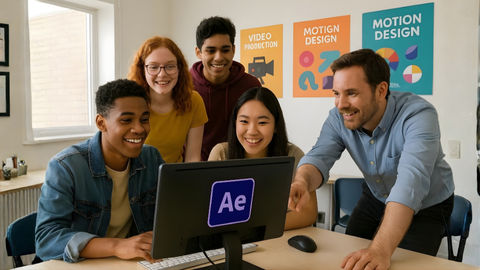
Classes maintain small sizes (typically 8-15 students) ensuring personalized attention. Adobe Certified Professional instructors bring real production experience, not just software knowledge. They’ve worked on actual client projects and understand motion graphics professionally.
The proprietary workbook provides detailed step-by-step instructions you’ll reference long after the bootcamp. Students consistently mention this resource as invaluable when working independently.
1-on-1 bonus training included with tuition provides personalized assistance. Review challenging concepts, get feedback on your projects, or receive guidance applying skills to specific work needs. This individual attention supplements the group instruction.
Flexible Learning Options
Attend in-person at Noble Desktop’s Manhattan campus with provided computers and software, or join live online via Zoom receiving the same interactive experience remotely. The self-paced option includes video lessons with instructor access for questions, offering flexibility while maintaining support.
Free retake within one year allows reinforcing concepts. Motion graphics skills develop through repetition; returning strengthens understanding. Class recordings remain available for 30 days, letting you review specific lessons.
Industry Recognition and Results
Over 209 students have rated this bootcamp 4.8 stars. Reviews consistently praise instructors’ knowledge, clarity, and patience. One student noted: “I went from being too afraid to open the program to being able to comfortably navigate the workspace and create cool, fun effects!”
Another shared: “After taking the After Effects class at Noble Desktop, I was able to create an animation immediately following completion of the course material.”
The verified digital certificate documents your completion, shareable on LinkedIn. Whether you’re a graphic designer expanding skills, marketer creating video content, or someone curious about motion graphics, this concentrated training provides practical After Effects foundations applicable immediately.